
Guides
How to Recreate a Pose From a Photo (Exactly)
August 9, 2026 · Updated September 4, 2026 · 6 min read · By the ShePoses team
The direct answer: match the framing first (selfie pose → selfie, full-body pose → full-body photo), then copy the big shapes in order — head tilt, shoulders, hips, limbs, hands — and check the result against the reference. Recreating a pose is a checklist, not a gift.
And if you'd rather skip the checklist: AI pose transfer can apply the reference pose directly to your photo. Both methods below — the manual one for when you're behind the camera, and the AI one for when you just want the photo.
Step 1: Pick the right reference
The pose has to match your shot type. A waist-up selfie pose cannot transfer to a full-body photo, and vice versa. Choose a reference with the same framing you want — selfie to selfie, full-body to full-body — and ideally similar camera height.
Save references when you see them: share the post to your pose library or screenshot it. The people who always look posed correctly are working from a collection, not from imagination.
Step 2: Break the pose into 5 checkpoints
Don't try to copy everything at once. Work top to bottom:
- Head — which way is it tilted? Where is the chin pointing?
- Shoulders — level, dropped on one side, or twisted toward/away from the camera?
- Torso and hips — facing the camera or angled? Weight on which foot?
- Arms and legs — straight, bent, crossed? Where does each limb start and end?
- Hands — touching hair, hip, pocket, prop, or resting? Soft fingers?
Step 3: Match the camera, not just the body
Half of a pose is where the camera was. Check the reference: is it shot from slightly above? At chest height? Close or far? Set your phone at the same height and distance before you judge your posing — a perfect pose at the wrong camera angle still looks wrong.
Step 4: Compare, adjust, reshoot
Shoot a burst, then put your photo next to the reference and run the 5 checkpoints again. You'll usually find one checkpoint is off — shoulders not twisted enough, hand in the wrong place. Fix one thing at a time; three rounds of this beats thirty random attempts.
The AI shortcut: transfer the pose instead
If what you actually want is the photo — not the practice — pose transfer skips everything above. In ShePoses you share the reference post straight from Instagram, TikTok, or Pinterest, add your own selfie or full-body photo, and the AI rebuilds your photo in the reference pose: same head tilt, same shoulders, same lines — while your face, outfit, jewelry, and background stay yours.
The result lands in about 30 seconds, and you can press and hold to compare it against your original. It's the difference between copying a pose and simply having it.
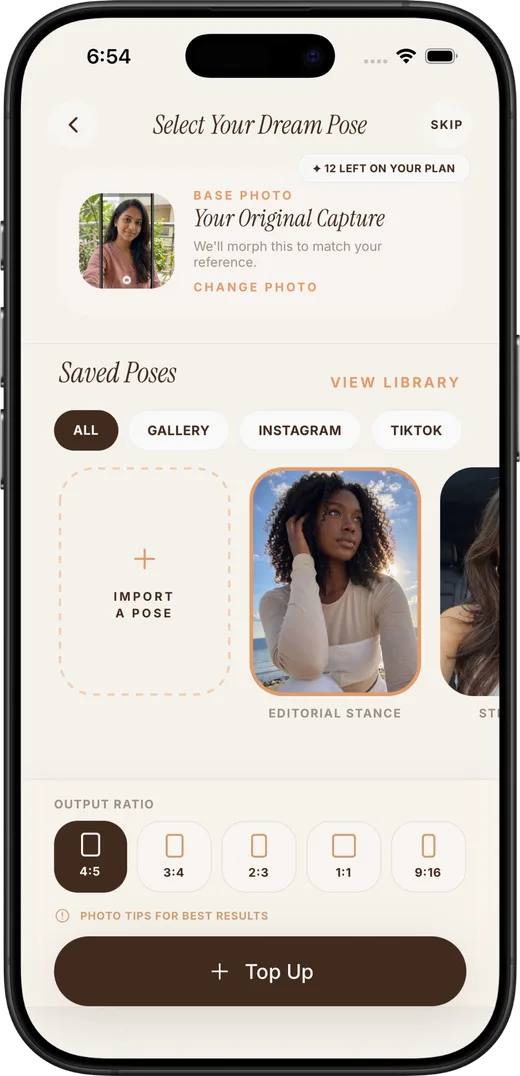
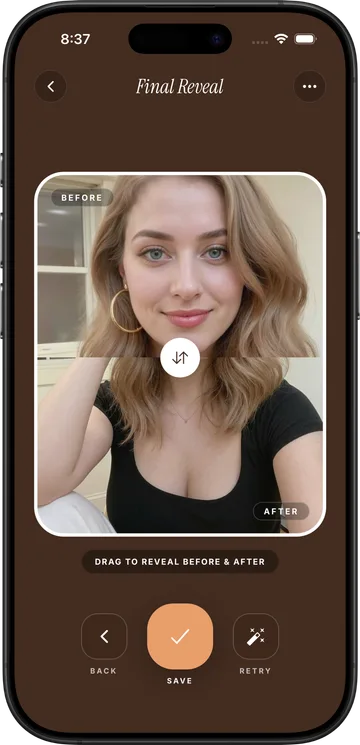
Skip the practice — transfer the pose
ShePoses applies any saved pose to your own photo with AI. Your face, outfit, and background stay yours — only the pose changes.
Download on the App StoreCommon questions
Is there an app that copies a pose from a photo?
Yes — that's exactly what ShePoses does. You import any pose photo (from Instagram, TikTok, Pinterest, or your gallery), add your own photo, and AI transfers the pose onto your picture while keeping your identity, outfit, and background. It's a paid iOS app with weekly and annual plans.
Can AI change my pose in a picture?
Yes. AI pose transfer takes two images — a reference pose and your photo — and generates a new image of you in the reference pose. Good implementations preserve your face, skin tone, outfit, and setting, and only the pose changes.
Why does my recreated pose look off?
Usually one of three things: the framing doesn't match (selfie reference vs full-body shot), the camera height differs from the reference, or one checkpoint — most often shoulder twist or hand placement — is slightly wrong. Compare against the reference one checkpoint at a time.
What reference photos work best?
Clear, single-person photos where the full pose is visible, with framing that matches your intended shot. Photo posts work well; videos and heavy motion blur do not.
